


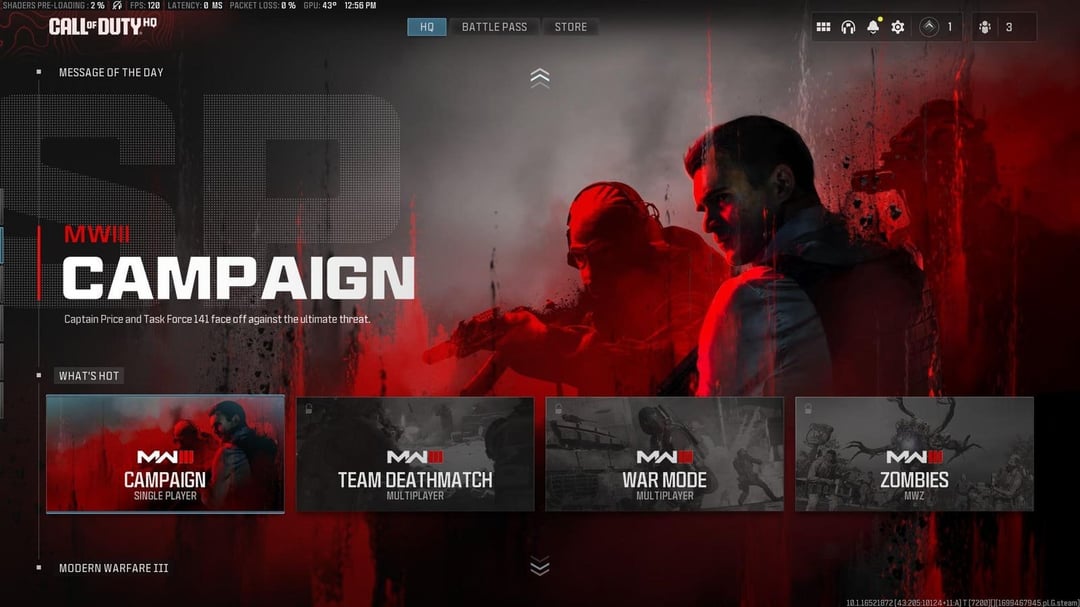
Let’s be real—if you’re a fan of the Call of Duty (CoD) franchise, you know the launcher situation hasn’t exactly been a walk in the park. For years, Modern Warfare II (MW2) and Modern Warfare III (MW3), along with Warzone, have been packed together in one massive launcher. Downloading everything at once, managing a bloated storage drive, and feeling like you’re carrying around a few dozen movies just to play your favorite variant? Yeah, it’s been… a lot. But here’s the scoop: Call of Duty’s launcher is finally slimming down. MW2 and MW3 are breaking away for solo acts, giving gamers more control and a lighter digital load.
Intrigued? Buckle up as we dive into what’s changing, why you should care, and how this shift might just make your gaming sessions smoother, snappier, and way more enjoyable.
The Call of Duty Launcher Makeover: What’s Changing?
First things first: Gamers can now install MW2 and MW3 as separate entities instead of being forced into a unified (and rather heavy) launcher. Activision is rolling out an update across Battle.net and other platforms that allows you to pick and choose only the titles you want, leaving behind the days of unnecessary gigabytes hogging valuable drive space.
Can you play MW2 and MW3 separately now?
Yes! With the new launcher setup, you can download, install, and launch MW2 or MW3 independently without keeping the entire bundle or unwanted modes clogging up your system.
This isn’t just a surface tweak; it’s a massive quality-of-life upgrade for both casual and hardcore Call of Duty community members. No more suffering through a full reinstall just to refresh a single game—or wrestling with a Warzone update when you just want classic multiplayer action. Freedom feels good, right?
Why the Split? Understanding the Big Move
So what triggered this change? The main driver is user feedback. Gamers have been vocal about the launcher’s size, the confusing UI, and the annoyance of managing all CoD titles in one place. In a digital era where storage is precious and players bounce between titles, forcing everything into one bundle just didn’t make sense anymore.
Why did Activision separate MW2 and MW3 in the launcher?
Activision separated the titles to improve user experience—making installations and updates more efficient while catering to players who only want a specific game, not the entire franchise at once.
The split also addresses persistent complaints about long download times, storage overload, and the complexity of navigating through a jumbled launcher. Remember those late-night updates just to play a single round? With MW2 and MW3 going solo, those days are numbered.
Storage Space: The Real MVP
Let’s talk storage, because in the age of SSDs and high-res everything, every gigabyte counts. Previously, keeping “just a little CoD on hand” could swell your hard drive by over 200GB if you hung onto all the attached titles and updates. Now, by cherry-picking which games to keep installed, you can reclaim precious storage space for other games, files, or, you know… actual real life stuff.
How much storage can you save with the new Call of Duty launcher?
You can potentially save up to dozens of gigabytes by installing only the Call of Duty titles you play, instead of the entire all-in-one package.
It’s a small move with big results. Minimalism is in, and your PC will thank you for it. Less digital bloat means faster load times and smoother performance across the board.
Performance Perks & Smoother Updates
If you’ve experienced sluggish load times or choppy performance due to a bloated launcher, this update brings good news. Separating MW2 and MW3 can help focus system resources, leading to improved performance—and updates that don’t interrupt each other. No more crossing your fingers that an update for Warzone won’t sideline your MW3 night with friends.
Does the new launcher update improve performance?
Yes, by reducing resource usage and streamlining installations, the updated launcher can lead to better game performance and shorter update times.
In fact, this was one of the most-requested features in various community surveys and feedback threads. It’s a tangible improvement, not just something that looks nice in patch notes.
More Control, Less Clutter
Another big win here: customization. Beyond just freeing up storage, you get more control over your launcher, seeing only the titles you want. This minimal approach is a huge step forward for accessibility and ease of use—which, let’s be honest, should be standard for any major gaming franchise at this point.
Can you choose which modes to install with MW2 and MW3 now?
Absolutely! The launcher lets you select specific modes and content, so you can tailor your installation to your actual play habits.
Navigating a clutter-free UI is just easier on the eyes and feels way less overwhelming. It’s like finally tidying your desktop and realizing how much faster you can get things done.
How to Take Advantage: Switching to the New Launcher
Ready to dive into the streamlined experience? Switching over is pretty simple. Look for the latest update notification on Battle.net, Xbox, PlayStation, or even Steam (depending on your platform). Follow the prompts to update, choose which games you’d like to keep or install separately, and voila—your launcher is all about you now.
How do you get MW2 and MW3 as separate downloads?
Make sure your launcher is updated, then follow on-screen options to install MW2, MW3, or both as standalone titles rather than bundled in the old mega-package.
If you get stuck or want more step-by-step help, Activision’s official support page has you covered: Call of Duty Launcher Changes FAQ.
Case Study: Gamers Reclaiming Their PCs
Let’s look at a real-world example. Jess, an avid CoD player from San Francisco, used to juggle Warzone, MW2, and MW3 between gaming sessions, constantly running out of SSD space and removing other games just to fit the next CoD update. With the new split, Jess installed only MW3 and left the rest behind, freeing up over 75GB. That’s a huge difference—enough for several indie games, photo albums, or video projects.
What do real gamers think of the new solo launcher option?
Most players are thrilled—they gain valuable storage, speedier updates, and a launcher that doesn’t feel overloaded or confusing to navigate.
For many, the new launcher feels like finally getting a closet organized: you can see (and play) exactly what you want, without sifting through clutter.
Comparing Call of Duty’s Approach to Other Game Launchers
If you’re already thinking, “Why didn’t this happen sooner?,” you’re not alone. Other franchises—think Halo on PC (with separate Master Chief Collection downloads) or even putting Rockstar’s titles in standalone apps—have long offered players the luxury of picking and choosing. CoD’s move brings it up to par with where modern launchers are heading.
Is the solo launcher now similar to other major game franchises?
Yes. By allowing standalone installations, Call of Duty now offers flexibility and simplicity that matches the best features from competitors’ launchers.
This is especially helpful for those of us who enjoy switching between different franchises without having to do digital gymnastics to keep everything installed.
Bonus: Supporting Tools and Community Add-ons
Want to make the most of your new, streamlined setup? Check out free tools like CCleaner to keep junk files at bay, gaming-focused SSD optimizers, or overlay utilities that help organize your desktop. Plus, the official Call of Duty forums are bustling with tips for maximizing your in-game experience post-update.
Even Discord communities have started tracking which solo setups perform best on different rigs—a sign of how seriously gamers are taking their newfound freedom! Don’t hesitate to check out community wikis and guides if you want to tweak things even further.
Wrapping Up: Is This the Dawn of a New CoD Era?
It’s about time, right? The Call of Duty launcher splitting MW2 and MW3 into standalone downloads marks a huge, positive step for gamers everywhere. If you’ve ever cursed a bloated install or put off updates because you dreaded the data drag, this change is for you.
Ready to reclaim your SSD, tidy your gaming library, and focus on what you actually want to play? Jump into the new launcher, share your experience with your squad, and let us know how it transforms your CoD sessions! 💬 Have tips, found quirks, or want to flex your lighter setup? Drop a comment, hit share, and let’s geek out together on the future of Call of Duty launches.
Q&A: All You Need to Know About the New Call of Duty Launcher
Q: Can I still play Warzone if I only install MW2 or MW3?
A: Yes! Warzone is its own install, so you can choose any combination of CoD titles without missing out on Warzone access.
Q: Will this reduce my update times for MW2 or MW3?
A: Absolutely. Standalone installations mean you’ll only download the updates you need for the games you play—saving time, bandwidth, and frustration.
Q: Does splitting the launcher affect my saved progress?
A: Not at all. Your progress, unlocks, and purchases are tied to your Activision or platform account, so you won’t lose anything in the transition.
Q: Are the new launcher changes available on all platforms?
A: The rollout covers Battle.net, Steam, Xbox, and PlayStation, but double-check your platform’s store for the specific update and instructions.
Q: What if I only want to play the campaign from MW2 or MW3?
A: The launcher’s new menu lets you select specific modes—including campaigns—so you can install only what you use and skip bulky extras.


